
A free and powerful music production tool
LMMS is a free digital audio workstation or DAW that lets you create music from your computer. It gives you an array of features to create melodies, beats, and sounds. With the help of this open-source application, you can synthesize and mix sounds, use musical instruments, repeat elements, and arrange samples. You can also connect the app to MIDI devices and perform live.
Top Recommended Alternative

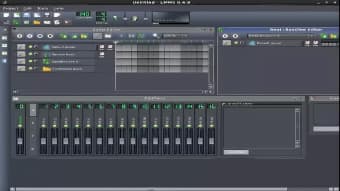
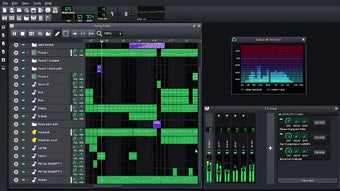
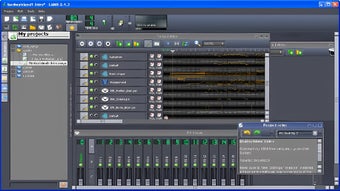
Unfortunately, the LMMS beatmaker doesn’t come with a simple interface. As you go along editing, you can open more windows and access different tools simultaneously. While the application seems overwhelming at first, it’s quite efficient and user-friendly once you familiarize yourself with the dashboard and its functions.
What is LMMS?
LMMS, short for Linux MultiMedia Studio, is an open-source and free music production software program for beginners and expert musicians. Developed by Tobias Junghans and Paul Giblock, the audio workstation lets you compose fresh music, synthesize existing tracks, use instrument sounds, and enable plugins for cross-platform support.
Once you complete the LMMS download on your device, you’re able to access a large number of features from its intuitive dashboard. You can use the available controls to record, mix, and edit songs. The software also lets users play sounds on repeat, add special effects, change volume, and blend different tunes.
What are the features of LMMS?
When you download LMMS studio, you get access to a range of keyboards that you can control by hand to create tunes and effects. You can even import WAV and OGG files and use them to create different sounds.
The program’s FX mixer includes effects that you can add to your collection. Apart from keyboards, LMMS also provides users with several musical instruments and sounds to use during mixing. Moreover, it gives users the option to add notes, edit instruments separately, and configure note playback via the keyboard.
Is LMMS good for beginners?
If you’ve never used a digital audio workstation before, you will find that the LMMS software download looks intimidating. The reason behind this is that the tool is open-source and consists of a comprehensive list of functions, all neatly placed on the primary window. The software also includes tabs for its FX mixer and controllers.
After you complete the LMMS download, you should refer to the application’s guidelines. With detailed and step-by-step instructions, you’ll start using this beat maker software to create music, edit sounds, mix beats, and add effects. The primary window also has a bassline and beat editor to make editing music much easier. In addition to this, the software includes LADSPA plugin support.
Do professionals use LMMS?
As a professional musician, you may wonder whether you should use an open-source tool to create music. However, you shouldn’t worry, as the software offers valuable features that are often unavailable in free tools. LMMS Windows comes with a triple oscillator that lets users adjust the volume and pitch of any tune. It also comes integrated with SF2 Player, known for its reverb features.
When you download the free beat maker, you will have access to numerous effects that you can use to enhance your music. The program includes a Waveshaper function and a Stereo Enhancer to make editing a breeze. Moreover, LMMS comes with a peak controller, bass booster, 10-band equalizer, mono and stereo amplifiers, bandpass filters, and spectrum analyzer.
Are there any alternatives?
While LMMS DAW is quite efficient in what it does, users may find the interface a little too daunting. In case you’d like to check out some free alternatives, you should explore REAPER and Audacity. You can’t go wrong with MAGIX Music Maker and BPM Studio if you want to download comprehensive and paid music production tools.
Is LMMS any good?
LMMS software is a free digital audio workstation that offers many features for beginners and advanced users. The program comes with built-in instruments, effects, mixing tools, sound clips, and more. It also lets you connect to MIDI devices and create sound loops for simple mixing and editing. The only drawback to the open-source software is that it features a complicated interface that may be overwhelming to users who’ve never worked with an audio production tool.